Saturday, May 26, 2012

Displaying popup in WPF

      A Popup window is a window that float over a window.In this blog post i’m going to to explain how can we create a sexy popup window like message box using xaml.Wpf has a popup control
Syntax

<Popup></Popup>

      Popup control can have a child inside the popup tags.If we want to add more contents we can use any layout panels like grid, stackpanel etc.
In popup if we set IsOpen property to true then the popup will be displayed and If IsOpen = false then the popup will be closed. In this example we will set IsOpen = true whenever we click on validate button and we will set it to false when we clicked on OK button.

popup

xaml

<Popup Name="myPopup" IsOpen="False" PlacementTarget="{Binding ElementName=ProjectTasks}" Placement="Center">
      <Grid Width="300" Background="Gray">
          <Grid.RowDefinitions>
              <RowDefinition Height="Auto"/>
              <RowDefinition Height="*"/>
              <RowDefinition Height="Auto"/>
         </Grid.RowDefinitions>
      <Border Grid.RowSpan="3" Background="Gray" BorderBrush="#3a3a3a" BorderThickness="1"/>
            <DockPanel  Width="300" Background="#3a3a3a" LastChildFill="True">
                <Image Source="/Images/Icons/attention.png" Width="15" Height="15" Margin="3"  DockPanel.Dock="Left"/>
<TextBlock  Padding="3" Grid.Row="0" Background="#3a3a3a" Text="Information" Foreground="White" FontWeight="Bold"/>
                </DockPanel>
              <TextBlock Width="260" Grid.Row="1" Margin="5" TextWrapping="Wrap" Foreground="white" Text="{Binding Path=ProjectValidateMessage}"></TextBlock>     


<Button Width="40" Height="20" Margin="5" Grid.Row="2" x:Name="btnPopup" Click="btnPopup_OnClick" Content="Ok" />
                        
      </Grid>
</Popup>


Code Behind:

public void btnPopup_OnClick(object Sender, RoutedEventArgs e)          
{             
    this.myPopup.IsOpen = false;         
}         
public void btnValidate_OnClick(object Sender,RoutedEventArgs e)
{             
    this.myPopup.IsOpen = true;         
}

Tuesday, May 22, 2012

Find current financial and Calendar Year in SQL Server

declare @d datetime
      set @d = GETDATE()
select
        DATEADD(yyyy, DATEDIFF(yyyy, 0, @d), 0) as [CalendarYear]
select
case
       when DATEPART(M, @d) >= 4 then DATEADD(mm, 3, DATEADD(yyyy, DATEDIFF(yyyy, 0, @d), 0))
        when DATEPART(M, @d) < 4 then DATEADD(mm, -9, DATEADD(yyyy, DATEDIFF(yyyy, 0, @d), 0))
end as [FinancialYear]

Monday, May 14, 2012

How to append a text field to an existing column in SQL Server

update table set fieldName = 'append string'+ fieldName where conditions

Example:

select *from AM_Invoice where DocumentTypeId = 3 and SalesInvoiceType = 2
update AM_Invoice set InvoiceNumber = 'B/'+InvoiceNumber where DocumentTypeId = 3 and SalesInvoiceType = 2
select *from AM_Invoice where DocumentTypeId = 3 and SalesInvoiceType = 2

result:

appendstring

Friday, May 4, 2012

Samsung reveals Galaxy SIII


Samsung reveals their most awaited android phone Galaxy SIII in an event held at London


Knockout

                        
          In these recent days I've been started learning Knockout. Knockout is a simple light weight java script library which helps us to create a rich user interface  web applications using MVVM patterns.
Knockout has a rich documentation and Live examples.you can get more from knockoutjs.com


Headline features:
  • Elegant dependency tracking - automatically updates the right parts of your UI whenever your data model changes.
  • Declarative bindings - a simple and obvious way to connect parts of your UI to your data model. You can construct a complex dynamic UIs easily using arbitrarily nested binding contexts.
  • Trivially extensible - implement custom behaviors as new declarative bindings for easy reuse in just a few lines of code.
Additional benefits:
  • Pure JavaScript library - works with any server or client-side technology
  • Can be added on top of your existing web application without requiring major architectural changes
  • Compact - around 13kb after gzipping
  • Works on any mainstream browser (IE 6+, Firefox 2+, Chrome, Safari, others)
  • Comprehensive suite of specifications (developed BDD-style) means its correct functioning can easily be verified on new browsers and platforms.
In this blog post i'm going to share the use full tutorials and blog links to learn knockout
    Live tutorial :  http://learn.knockoutjs.com/
    my jsfiddle samples : http://jsfiddle.net/rgopal_p/QUrQ7/

link list will updated... :)


Saturday, December 10, 2011

Send a Html mail through outlook in asp.net mvc

images (1)
                 Recently we have  faced a situation to send a html formatted mail in our asp.net mvc application. We want to provide an option to users  to open their html formatted mails in outlook because user can edit the mail and can send it to their outlook contacts.Pramod tell me an idea it was quite enough to solve our problem.we have take the html from our template view and send it through smtpClient. we have used pickupDirectory option of webmail, using this we can send mail in to a particular directory, it will save as a .eml file. A custom action result will do all this things and download it as an outlook file. now user can send it by opening it in outlook
Here is the custom action result
public class MailResult : ActionResult    {  
       string _content;         
       string _viewName;         
       string _contentType = "message/rfc822";         
       dynamic _model;         
       string _fromMailAddress;         
       string _toMailAddress;                  
       public MailResult(string AViewName,dynamic AModel,string AFromMail,string AToMail)             {             
           _viewName = AViewName;             
           _model = AModel;             
          _fromMailAddress = AFromMail;             
          _toMailAddress=AToMail;         
        }         
       public override void ExecuteResult(ControllerContext context)         
        {  var view = ViewEngines.Engines.FindView(context, _viewName, null);             
           var ViewData = new ViewDataDictionary();             
           var TempData = new TempDataDictionary();             
           ViewData.Model = _model;             
           using (var writer = new StringWriter())             
            {                 
             var ccontext = new ViewContext(context, view.View, ViewData, TempData, writer);              ViewData.Model = _model;                 
             view.View.Render(ccontext, writer);                 
             writer.Flush();                 
             _content = writer.ToString();             
            }             
          System.Net.Mail.MailMessage msg = new MailMessage();             
          msg.From = new MailAddress(_fromMailAddress);             
         msg.To.Add(new MailAddress(_toMailAddress));             
          msg.IsBodyHtml = true;             
         msg.Body = _content;             
        SmtpClient smtp = new SmtpClient();             
        smtp.PickupDirectoryLocation 
          = context.HttpContext.Request.ServerVariables["APPL_PHYSICAL_PATH"];             
        smtp.PickupDirectoryLocation = smtp.PickupDirectoryLocation + @"\Content\Mail\";             Guid newGuId = Guid.NewGuid();             
        string fname = smtp.PickupDirectoryLocation + newGuId + ".eml";             
        //Save is an Extension method, using this we can specify the guid in to that ie; for            deleting        msg.Save(fname);             
        context.HttpContext.Response.Clear();             
        context.HttpContext.Response.AddHeader("Content-Disposition",string.Format("attachmen         t; filename={0}", "mail.eml"));             
         context.HttpContext.Response.Charset = "";             
         context.HttpContext.Response.Cache.SetCacheability(HttpCacheability.NoCache);       
         context.HttpContext.Response.ContentType = _contentType              
         context.HttpContext.Response.TransmitFile(fname);
         context.HttpContext.Response.End();             
         System.IO.File.Delete(fname); 
          }     
}


Extension Method:

(extension method source: codeproject)
public static class MailMessageExt
{     
   public static void Save(this MailMessage Message, string FileName)     
    {         
       Assembly assembly = typeof(SmtpClient).Assembly;
       Type _mailWriterType = assembly.GetType("System.Net.Mail.MailWriter"); 
       using (FileStream _fileStream = new FileStream(FileName, FileMode.Create)) 
        {             
          // Get reflection info for MailWriter contructor
           ConstructorInfo _mailWriterContructor = _mailWriterType.GetConstructor(                     BindingFlags.Instance | BindingFlags.NonPublic,null,new Type[] { typeof(Stream) },           null);             
          // Construct MailWriter object with our FileStream
            object _mailWriter = _mailWriterContructor.Invoke(new object[] { _fileStream });             // Get reflection info for Send() method on MailMessage
            MethodInfo _sendMethod 
     = typeof(MailMessage).GetMethod("Send",BindingFlags.Instance | BindingFlags.NonPublic);             // Call method passing in MailWriter            
           _sendMethod.Invoke(Message,BindingFlags.Instance | BindingFlags.NonPublic,                    null,new object[] { _mailWriter, true },null);             
           // Finally get reflection info for Close() method on our MailWriter
            MethodInfo _closeMethod = _mailWriter.GetType().GetMethod("Close",                           BindingFlags.Instance | BindingFlags.NonPublic); 
            // Call close method            
          _closeMethod.Invoke(_mailWriter,BindingFlags.Instance | BindingFlags.NonPublic,                 null,new object[] { },null);         
           }     
     }
}

Monday, November 7, 2011

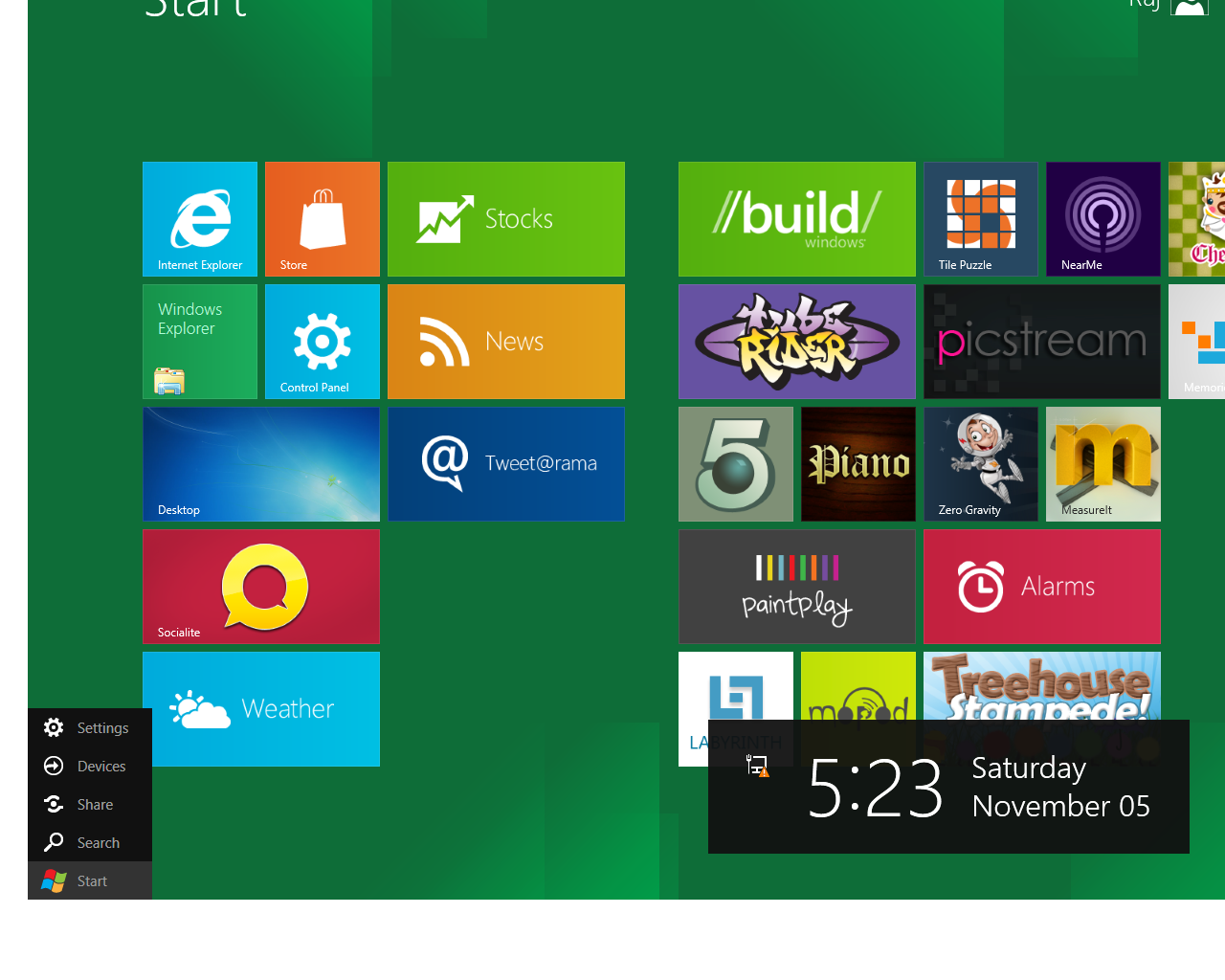
Windows-8 Developer preview

         One week ago I've installed win-8 developer preview in ma desktop. some screen shots..